
Get Microsoft MB-280 Exam Practice Questions - Real and Updated
Microsoft Dynamics 365 Customer Experience Analyst Exam Dumps
This Bundle Pack includes Following 3 Formats
Test software
Practice Test
Answers (PDF)

MB-280 Desktop Practice
Test Software
Total Questions : 121

MB-280 Questions & Answers
(PDF)
Total Questions : 121

MB-280 Web Based Self Assessment Practice Test


Following are some MB-280 Exam Questions for Review


Note: This question is part of a series of questions that present the same scenario. Each question in the series contains a unique solution that might meet the stated goals. Some question sets might have more than one correct solution, while others might not have a correct solution.
After you answer a question in this section, you will NOT be able to return to it. As a result, these questions will not appear in the review screen.
A company's IT department has a .CSV file stored on one of their Shared Documents folders within their Microsoft SharePoint sites. The data from the .CSV file is ingested into Dynamics 365 Customer Insights - Data.
The file contains a row header and columns of different types, such as quantities and prices. The file also contains some rows with a high proportion of nulls.
You need to clean and transform the data in Customer Insights - Data to be ready for unification.
Solution: Transform the first row to be used as headers, and remove any special characters or spaces from header row. Remove rows with missing primary keys and name the query. Select Next and your data is now ready for unification.
Does this meet the goal?
You need to configure search to ensure the administrators can find all records which reference Corgis. Which action must you perform?
A company manufactures widgets. Widgets can be sold in the following ways:
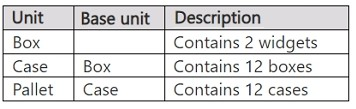
The company discovers that customers want to buy widgets individually.
You need to add a unit named Each.
What should you do?
Note: This question is part of a series of questions that present the same scenario. Each question in the series contains a unique solution that might meet the stated goals. Some question sets might have more than one correct solution, while others might not have a correct solution.
After you answer a question in this section, you will NOT be able to return to it. As a result, these questions will not appear in the review screen.
A company's IT department has a .CSV file stored on one of their Shared Documents folders within their Microsoft SharePoint sites. The data from the .CSV file is ingested into Dynamics 365 Customer Insights - Data.
The file contains a row header and columns of different types, such as quantities and prices. The file also contains some rows with a high proportion of nulls.
You need to clean and transform the data in Customer Insights - Data to be ready for unification.
Solution: Remove any rows where the primary key is missing, delete any leading or trailing zeros on the primary key, and name the query. Select Next and your data is now ready for unification.
Does this meet the goal?
A company's IT department has a .CSV file stored on one of their Shared Documents folders within their Microsoft SharePoint sites. The data from the .CSV file is ingested into Dynamics 365 Customer Insights - Data.
The file contains a row header and columns of different types, such as quantities and prices. The file also contains some rows with a high proportion of nulls.
You need to clean and transform the data in Customer Insights - Data to be ready for unification.
Solution: Transform the first row to be used as headers. Define column types to be appropriate field types and name the query. Create a full name and full address columns by merging the appropriate columns if they exist. Select Next and your data is now ready for unification.
Does this meet the goal?
Unlock All Features of Microsoft MB-280 Dumps Software

Types you want

pass percentage

(Hours: Minutes)

Practice test with
limited questions

Support


