What will happen to the host of a guest user created from this template if the time of connection is 8:00 PM?
Answer : A
In FortiNAC-F, the Guest & Contractor Template is a configuration object that defines the parameters for accounts created by sponsors or through self-registration. One of the critical security controls within this template is the Login Availability setting. This setting restricts the specific days and times during which a guest or contractor is permitted to authenticate and access the network.
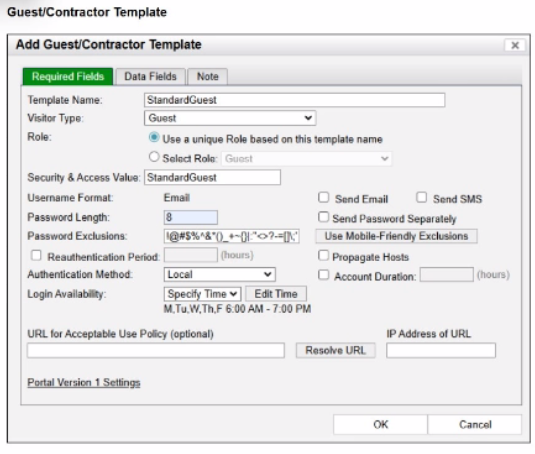
As shown in the exhibit, the 'StandardGuest' template has Login Availability set to 'Specify Time', with a schedule defined as Mon-Fri, 6:00 AM to 7:00 PM. If a guest user attempts to connect or authenticate at 8:00 PM, which is outside of the permitted window, FortiNAC-F's policy engine will automatically deny the authentication request. When an authentication attempt is denied due to schedule restrictions, the system does not move the host into the 'Authenticated' or 'Registered' state required for production access. Instead, the host is marked as non-authenticated in the adapter or host view.
This behavior ensures that even if a guest possesses valid credentials, their access is strictly bound by the organizational policy for visitor hours. The host will typically remain in its current isolation or registration VLAN, and the user will see a message on the captive portal indicating that their account is not currently authorized for login. It is important to distinguish this from 'at-risk' (C), which relates to security scan failures, or 'rogue' (B), which typically refers to unknown devices that have not yet been associated with a valid account or profiling rule.
'Login Availability defines the timeframe during which the guest or contractor account is valid for network access. This schedule is enforced at the time of authentication. If a user attempts to log in outside of the designated window, the authentication is rejected by the system. Consequently, the host record will reflect a non-authenticated status, and the device will remain restricted to the isolation or registration network until a valid login window is reached.' --- FortiNAC-F Administration Guide: Guest and Contractor Templates Section.
When configuring isolation networks in the configuration wizard, why does a layer 3 network typo allow for mora than ono DHCP scope for each isolation network typo?
Answer : C
In FortiNAC-F, the Layer 3 Network type is specifically designed for deployments where the isolation networks---such as Registration, Remediation, and Dead End---are separated from the FortiNAC appliance's service interface (port2) by one or more routers. This architecture is common in large, distributed enterprise environments where endpoints in different physical locations or branches must be isolated into subnets that are local to their respective network equipment.
The reason the Configuration Wizard allows for more than one DHCP scope for a single isolation network type (state) is that there can be more than one isolation network of each type across the infrastructure. For instance, if an organization has three different sites, each site might require its own unique Layer 3 registration subnet to ensure efficient routing and to accommodate local IP address management. By allowing multiple scopes for the 'Registration' state, FortiNAC can provide the appropriate IP address, gateway, and DNS settings to a rogue host regardless of which site's registration VLAN it is placed into.
When an endpoint is isolated, the network infrastructure (via DHCP Relay/IP Helper) directs the DHCP request to the FortiNAC service interface. FortiNAC then identifies which scope to use based on the incoming request's gateway information. This flexibility ensures that the system is not limited to a single flat subnet for each isolation state, supporting a scalable, multi-routed network topology.
'Multiple scopes are allowed for each isolation state (Registration, Remediation, Dead End, VPN, Authentication, Isolation, and Access Point Management). Within these scopes, multiple ranges in the lease pool are also permitted... This configWizard option is used when Isolation Networks are separated from the FortiNAC Appliance's port2 interface by a router.' --- FortiNAC-F Configuration Wizard Reference Manual: Layer 3 Network Section.
Based on the given configurations and settings, on which date and time would a guest account created at 8:00 AM on 2025/09/12 expire?
Answer : D
Questio ns no: 22
Verified Answe r: D
Comprehensive and Detailed 250 to 300 words each Explanation with Exact Matched Extract from FortiNAC-F Administrator library and documentation for current versions (including F 7.2, 7.4, and 7.6) documents:
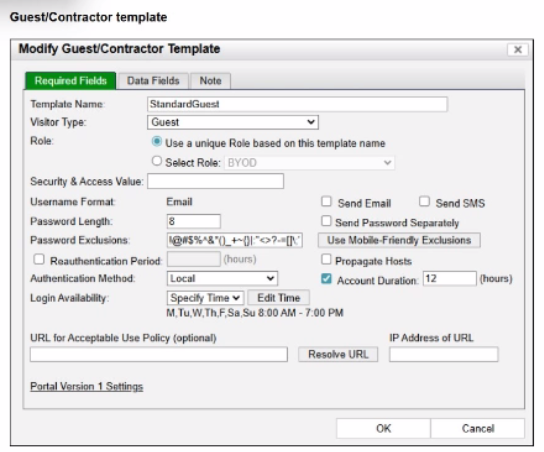
In FortiNAC-F, the expiration of a guest or contractor account is determined by the configuration settings within the Account Creation Wizard and the associated Guest/Contractor Template. While a template can define a default 'Account Duration' (as seen in the 12-hour setting in the second exhibit), the Account Creation Wizard allows an administrator to manually specify or override the start and end parameters for a specific user session.
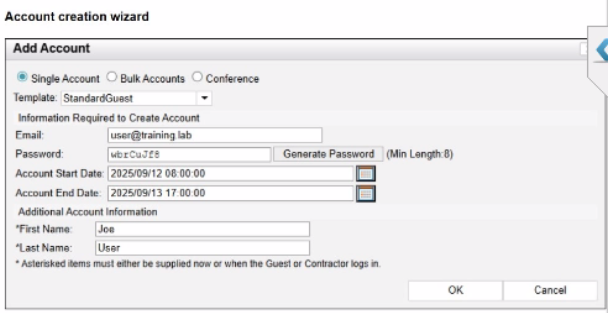
According to the FortiNAC-F Administration Guide regarding guest management, the Account End Date field in the creation wizard is the definitive timestamp for when the account object will be disabled or deleted from the system. In the provided exhibit (Account Creation Wizard), the administrator has explicitly set the Account Start Date to 2025/09/12 08:00:00 and the Account End Date to 2025/09/13 17:00:00.
Even though the template indicates an 'Account Duration' of 12 hours, this value typically serves as a pre-populated default. When a manual date and time are entered into the wizard, those specific values take precedence for that individual account. The account will remain active and valid until 5:00 PM (17:00:00) on the following day, 2025/09/13. It is also important to note the 'Login Availability' from the template (8:00 AM - 7:00 PM); while the account exists until the 13th at 17:00:00, the user would only be able to authenticate during the active hours defined by the login schedule on both days.
'When creating an account, the administrator can select a template to provide default settings. However, specific values such as the Account End Date can be modified within the Account Creation Wizard. The date and time specified in the 'Account End Date' field determines the absolute expiration of the account. Once this time is reached, the account is moved to an expired state and the user's network access is revoked.' --- FortiNAC-F Administration Guide: Guest and Contractor Account Management.
An administrator wants FortiNAC-F to return a group of user-defined RADIUS attributes in RADIUS responses.
Which condition must be true to achieve this?
Answer : B
In FortiNAC-F, the RADIUS Attribute Groups feature allows administrators to return customized RADIUS attributes (such as specific VLAN IDs, filter IDs, or vendor-specific attributes) in an Access-Accept packet sent back to a network device. This is particularly useful for supporting 'Generic RADIUS' devices that are not natively supported but can be managed using standard AVPairs.
According to the FortiNAC-F Generic RADIUS Wired Cookbook and the RADIUS Attribute Groups section of the Administration Guide, there is one critical prerequisite for this feature to function: the inbound RADIUS request must contain the Calling-Station-ID attribute. The Calling-Station-ID typically contains the MAC address of the connecting endpoint. Because FortiNAC-F is a host-centric system, it uses the MAC address as the unique identifier to look up the host record, evaluate the associated Network Access Policy, and determine which Logical Network (and thus which Attribute Group) should be applied. If the incoming request lacks this attribute, FortiNAC-F cannot reliably identify the host and, as a safety mechanism, will not include any user-defined RADIUS attributes in the response. This ensures that unauthorized or unidentifiable devices do not receive privileged access through misapplied attributes.
'Configure a set of attributes that must be included in the RADIUS Access-Accept packet returned by FortiNAC... Requirement: Inbound RADIUS request must contain Calling-Station-Id. Otherwise, FortiNAC will not include the RADIUS attributes. This attribute is used to identify the host and its current state within the FortiNAC database.' --- FortiNAC-F 7.6.0 Generic RADIUS Wired Cookbook: Configure RADIUS Attribute Groups.
What would FortiNAC-F generate if only one of the security fitters is satisfied?
Answer : D
In FortiNAC-F, Security Triggers are used to identify specific security-related activities based on incoming data such as Syslog messages or SNMP traps from external security devices (like a FortiGate or an IDS). These triggers act as a filtering mechanism to determine if an incoming notification should be escalated from a standard system event to a Security Event.
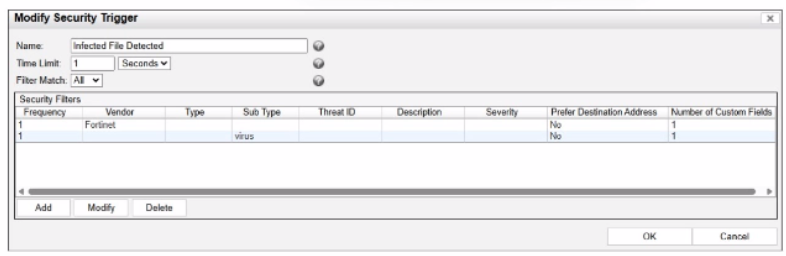
According to the FortiNAC-F Administrator Guide and relevant training materials for versions 7.2 and 7.4, the Filter Match setting is the critical logic gate for this process. As seen in the exhibit, the 'Filter Match' configuration is set to 'All'. This means that for the Security Trigger named 'Infected File Detected' to 'fire' and generate a Security Event or a subsequent Security Alarm, every single filter listed in the Security Filters table must be satisfied simultaneously by the incoming data.
In the provided exhibit, there are two filters: one looking for the Vendor 'Fortinet' and another looking for the Sub Type 'virus'. If only one of these filters is satisfied (for example, a message from Fortinet that does not contain the 'virus' subtype), the logic for the Security Trigger is not met. Consequently, FortiNAC-F does not escalate the notification. Instead, it processes the incoming data as a Normal Event, which is recorded in the Event Log but does not trigger the automated security response workflows associated with security alarms.
'The Filter Match option defines the logic used when multiple filters are defined. If 'All' is selected, then all filter criteria must be met in order for the trigger to fire and a Security Event to be generated. If the criteria are not met, the incoming data is processed as a normal event. If 'Any' is selected, the trigger fires if at least one of the filters matches.' --- FortiNAC-F Administration Guide: Security Triggers Section.
Unlock All Features of Fortinet NSE5_FNC_AD_7.6 Dumps Software
Just have a look at the best and updated features of our NSE5_FNC_AD_7.6 dumps which are described in detail in the following tabs. We are very confident that you will get the best deal on this platform.
Select Question Types you want
Set your desired pass percentage
Allocate Time (Hours: Minutes)
Create Multiple Practice test with limited questions
Customer Support
Latest Success Metrics For actual NSE5_FNC_AD_7.6 Exam
This is the best time to verify your skills and accelerate your career. Check out last week's results, more than 90% of students passed their exam with good scores. You may be the Next successful Candidate.
95%
Average Passing Scores in final Exam
91%
Exactly Same Questions from these dumps
90%
Customers Passed Fortinet NSE5_FNC_AD_7.6 exam
OUR SATISFIED CUSTOMER REVIEWS
Grim
June 3, 2026
Premiumdumps Practice Questions have been a help for me whilst preparing for my Fortinet NSE5_FNC_AD_7.6 test. I wanted to have 99% marks in the test and I did! Thanks to Premiumdumps!
Carlos Perez
June 1, 2026
Thank you Premiumdumps for offering the best and quality updated dumps questions and making me the certified Professional.
Jhonson
May 30, 2026
Premiumdumps is providing a very reliable support to all of the customers and so to me! I am very much obliged! I got 85% marks in my Certification test and this happened just because of Premiumdumps.
Yuko Tanaka
May 28, 2026
Premiumsdumps practice questions prepared me well for my Fortinet NSE5_FNC_AD_7.6 exams. And helped me to eliminate the exam anxiety. I didn’t feel any pressure while in the exam, because the practice exam of Premiumdumps was quite similar and helped me to pass exam on the first try.
Emma Grace
May 26, 2026
Premiumdumps is a reliable and trustworthy platform, which enabled me to pass NSE5_FNC_AD_7.6. I am grateful that I only trusted Premiumdumps.
Leon Müller
May 24, 2026
I wish to share enthusiastically that I have finally advanced the credentials. And this has become possible just because of the Premiumdumps exam preparation material.
Mia Elizabeth
May 23, 2026
I passed the Fortinet NSE5_FNC_AD_7.6 exam with the help of Premiumdumps. I am glad to chose the right material to become successful in my career.