Which statement about the event displayed is correct?
Answer : B
In FortiOS and FortiAnalyzer logging systems, when an event has a status of 'Mitigated' in the Event Status column, it typically indicates that the system took action to address the identified threat. In this case, the Web Filter blocked the web request to a suspicious destination, and the event status 'Mitigated' confirms that the action was successfully implemented to neutralize or block the security risk.
Let's review the answer options:
Option A: The risk source is isolated.
This is incorrect because 'isolated' would imply that FortiGate took further steps to prevent the source device from communicating with the network. There is no indication of isolation in this event status.
Option B: The security risk was blocked or dropped.
This is correct. The 'Mitigated' status, along with the Web Filter event type and the accompanying description, implies that the FortiGate or FortiAnalyzer successfully blocked or dropped the suspicious web request, which corresponds to the term 'mitigated.'
Option C: The security event risk is considered open.
This is incorrect because an open status would indicate that no action was taken, or the threat is still present. The 'Mitigated' status indicates that the threat has been addressed.
Option D: An incident was created from this event.
This option is not correct or evident based on the given display. Although FortiAnalyzer or FortiGate could escalate certain events to incidents, this is not indicated here.
The FortiOS 7.4.1 and FortiAnalyzer 7.4.1 documentation specify that 'Mitigated' status in logs means the identified threat was handled, usually by blocking or dropping the action associated with the event, particularly with Web Filter and Security Policy logs.
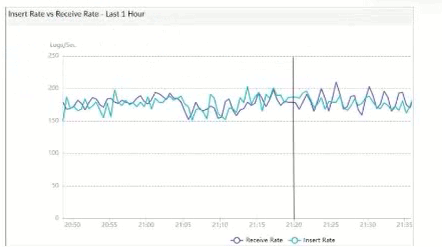
The exhibit shows a graph that tracks two metrics over time: Receive Rate and Insert Rate. These two rates are crucial for understanding the log processing behavior in FortiAnalyzer.
Understanding Receive Rate and Insert Rate:
Receive Rate: This is the rate at which FortiAnalyzer is receiving logs from connected devices.
Insert Rate: This is the rate at which FortiAnalyzer is indexing (inserting) logs into its database for storage and analysis.
Data Point at 21:20:
At 21:20, the Insert Rate line is above the Receive Rate line, indicating that FortiAnalyzer is inserting logs into its database at a faster rate than it is receiving them. This situation suggests that FortiAnalyzer is able to keep up with the incoming logs and is possibly processing a backlog or temporarily received logs faster than new logs are coming in.
Option Analysis:
Option A - FortiAnalyzer is Indexing Logs Faster Than Logs are Being Received: This accurately describes the scenario at 21:20, where the Insert Rate exceeds the Receive Rate. This indicates that FortiAnalyzer is handling logs efficiently at that moment, with no backlog in processing.
Option B - The fortilogd Daemon is Ahead in Indexing by One Log: The data does not provide specific information about the fortilogd daemon's log count, only the rates. This option is incorrect.
Option C - SQL Database Requires a Rebuild: High receive lag would imply a backlog in receiving and indexing logs, typically visible if the Receive Rate were significantly above the Insert Rate, which is not the case here.
Option D - FortiAnalyzer is Temporarily Buffering Logs to Index Older Logs First: There is no indication of buffering in this scenario. Buffering would usually occur if the Receive Rate were higher than the Insert Rate, indicating that FortiAnalyzer is storing logs temporarily due to indexing lag.
Conclusion:
Correct Answe r : A. FortiAnalyzer is indexing logs faster than logs are being received.
The graph at 21:20 shows a higher Insert Rate than Receive Rate, indicating efficient log processing by FortiAnalyzer.
FortiAnalyzer 7.4.1 documentation on log processing metrics, Receive Rate, and Insert Rate indicators.
An administrator on your team has configured multiple reports to run periodically. Management has an additional request that all new generated reports be sent to a company email inbox for accessibility. The mail server has already been configured on FortiAnalyzer.
Which item must configure on FortiAnalyzer so that emails are sent when the reports are generated?
Answer : D
To ensure that reports generated by FortiAnalyzer are automatically sent to an email inbox, you need to set up an output profile for the reports. Output profiles specify where and how reports should be delivered, including the option to send them via email.
Option A - Enable the Option to Email All Reports Under the Mail Server:
The mail server configuration allows FortiAnalyzer to send emails but does not automatically enable email distribution for reports. This setting alone does not specify which reports to send or to whom.
Conclusion: Incorrect.
Option B - Add a mailto:<email address> Option Within the Report Layouts:
Adding an email address within the report layout is not a standard configuration option for report distribution. Report layouts define the format and content of the report but not its distribution method.
Conclusion: Incorrect.
Option C - Enable Email Notification Under the Report Calendar:
The report calendar is used to schedule when reports are generated. While it triggers report generation at specific times, it does not handle email distribution. Emailing reports requires a configured output profile.
Conclusion: Incorrect.
Option D - Enable an Output Profile on the Reports:
An output profile can be configured on FortiAnalyzer to define delivery options, including emailing the report to specified recipients. This setup ensures that every time a report is generated according to the schedule, it is automatically emailed to the configured address.
Conclusion: Correct.
Conclusion:
Correct Answe r : D. Enable an output profile on the reports.
Configuring an output profile is the correct way to set up automatic email distribution of generated reports in FortiAnalyzer.
FortiAnalyzer 7.4.1 documentation on configuring output profiles and report distribution settings.
After a generated a repot, you notice the information you were expecting to see in not included in it. However, you confirm that the logs are there:
Which two actions should you perform? (Choose two.)
Answer : A, D
When a generated report does not include the expected information despite the logs being present, there are several factors to check to ensure accurate data representation in the report.
Option A - Check the Time Frame Covered by the Report:
Reports are generated based on a specified time frame. If the time frame does not encompass the period when the relevant logs were collected, those logs will not appear in the report. Ensuring the time frame is correctly set to cover the intended logs is crucial for accurate report content.
Conclusion: Correct.
Option B - Disable Auto-Cache:
Auto-cache is a feature in FortiAnalyzer that helps optimize report generation by using cached data for frequently used datasets. Disabling auto-cache is generally not necessary unless there is an issue with outdated data being used. In most cases, it does not directly impact whether certain logs are included in a report.
Conclusion: Incorrect.
Option C - Increase the Report Utilization Quota:
The report utilization quota controls the resource limits for generating reports. While insufficient quota might prevent a report from generating or completing, it does not typically cause specific log entries to be missing. Therefore, this option is not directly relevant to missing data within the report.
Conclusion: Incorrect.
Option D - Test the Dataset:
Datasets in FortiAnalyzer define which logs and fields are pulled into the report. If a dataset is misconfigured, it could exclude certain logs. Testing the dataset helps verify that the correct data is being pulled and that all required logs are included in the report parameters.
Conclusion: Correct.
Conclusion:
Correct Answe r : A. Check the time frame covered by the report and D. Test the dataset.
These actions directly address the issues that could cause missing information in a report when logs are available but not displayed.
FortiAnalyzer 7.4.1 documentation on report generation settings, time frames, and dataset configuration.
Which statement about sending notifications with incident update is true?
Answer : A
In FortiOS and FortiAnalyzer, incident notifications can be sent to multiple external platforms, not limited to a single method such as email. Fortinet's security fabric and integration capabilities allow notifications to be sent through various fabric connectors and third-party integrations. This flexibility is designed to ensure that incident updates reach relevant personnel or systems using preferred communication channels, such as email, Syslog, SNMP, or integration with SIEM platforms.
Let's review each answer option for clarity:
Option A: You can send notifications to multiple external platforms
This is correct. Fortinet's notification system is capable of sending updates to multiple platforms, thanks to its support for fabric connectors and external integrations. This includes options such as email, Syslog, SNMP, and others based on configured connectors.
Option B: Notifications can be sent only by email
This is incorrect. Although email is a common method, FortiOS and FortiAnalyzer support multiple notification methods through various connectors, allowing notifications to be directed to different platforms as per the organization's setup.
Option C: If you use multiple fabric connectors, all connectors must have the same settings
This is incorrect. Each fabric connector can have its unique configuration, allowing different connectors to be tailored for specific notification and integration requirements.
Option D: Notifications can be sent only when an incident is updated or deleted
This is incorrect. Notifications can be sent upon the creation of incidents, as well as upon updates or deletion, depending on the configuration.
Unlock All Features of Fortinet FCP_FAZ_AN-7.4 Dumps Software
Just have a look at the best and updated features of our FCP_FAZ_AN-7.4 dumps which are described in detail in the following tabs. We are very confident that you will get the best deal on this platform.
Select Question Types you want
Set your desired pass percentage
Allocate Time (Hours: Minutes)
Create Multiple Practice test with limited questions
Customer Support
Latest Success Metrics For actual FCP_FAZ_AN-7.4 Exam
This is the best time to verify your skills and accelerate your career. Check out last week's results, more than 90% of students passed their exam with good scores. You may be the Next successful Candidate.
95%
Average Passing Scores in final Exam
91%
Exactly Same Questions from these dumps
90%
Customers Passed Fortinet FCP_FAZ_AN-7.4 exam
OUR SATISFIED CUSTOMER REVIEWS
Ava Grace
July 3, 2026
When I got enrolled in Fortinet FCP_FAZ_AN-7.4, I was told that Premiumdumps is the only key to all of my worries regarding my Exam. I scored well and it justifies the standard of Premiumdumps
James Henry
July 2, 2026
With the help of Premiumdumps exam questions, I scored well in the Fortinet FCP_FAZ_AN-7.4 certification exam. I am grateful to Premiumdumps who made me pass the exam.
David Smith
June 29, 2026
When I got registered for Fortinet FCP_FAZ_AN-7.4 exam, I was so afraid even to try. I gave-up initially, but then I found Premiumumps and today I am proud to make a right decision. I only spend 7 days in preparation, but the result was unanticipated. I got 100% marks and finally advanced my credentials.
Carlos Perez
June 28, 2026
Thank you Premiumdumps for offering the best and quality updated dumps questions and making me the certified Professional.
Kenji Sato
June 25, 2026
The Fortinet FCP_FAZ_AN-7.4 certification exam is very tough, and it was a challenging task to pass it. When I attempted it first time I couldn’t pass the exam, but then my colleague recommended me Premiumdumps exam material. The Premiumdumps offers best quality features, which enabled me to clear exam with exceptional grades.
Mia Elizabeth
June 24, 2026
I passed the Fortinet FCP_FAZ_AN-7.4 exam with the help of Premiumdumps. I am glad to chose the right material to become successful in my career.
Noah James
June 21, 2026
I, being an average student, scored really well in FCP_FAZ_AN-7.4 FCP - FortiAnalyzer 7.4 Analyst exam, only because of Premiumdumps practice questions. I highly recommend you to try actual exam dumps of Premiumdumps and pass the exam on the first try.