
You have created a composite report and are trying to add a matrix report as a subreport. However, when trying to configure a Data column, the matrix report is not available to select in the Sub Report Name field.
What can you check to identify the cause of this issue?
Answer : A
For a matrix report to be eligible as a subreport in a composite report, Workday requires strict alignment between the composite report's enabled fields and the matrix report's group-by fields. Specifically, every field enabled for filtering and grouping in the composite report must also exist as a group-by field in the matrix report.
If this alignment does not exist, Workday excludes the matrix report from the Sub Report Name selection list because the system cannot reliably aggregate or align the summarized data across reports.
Workday HCM Reporting documentation states:
''When using matrix reports as subreports in composite reports, the group-by fields must align with the composite report's enabled grouping and filtering fields.''
''Matrix reports that do not meet grouping alignment requirements will not be available for selection as subreports.''
The other options do not control subreport eligibility:
Summarization fields affect calculations, not availability.
Filter alignment is validated later, not at selection time.
Prompt defaults do not determine whether a report appears in the Sub Report Name field.
How can you view the latest content housed in WDSetup?
Answer : C
Workday maintains a shared WDSetup tenant where customers can access the latest delivered content, including reports, dashboards, and calculated field templates. Customers must log in through the Workday Community portal to access this tenant.
From the Workday binder: ''The WDSetup tenant provides shared configuration content maintained by Workday. Customers can access the tenant through Workday Community to review the latest delivered reports and dashboards.''
The other options are incorrect: Object Transporter (OX) migrates content between customer tenants, not WDSetup. Customer Central is a separate tenant for learning, not for content review. The ''What's New'' report shows system updates, not the latest WDSetup content.
Therefore, the correct answer is C. Sign in to the Shared WDSetup tenant through the Workday Community.
A report that uses an indexed data source is running slowly for an HR analyst. The report is sorted by the Worker object field.
What can you do to improve the sorting performance?
Answer : B
When reports use Indexed Data Sources, performance issues can arise if sorting is attempted on fields that are not indexed. In the case of the Worker object, sorting directly by the Worker object field is slower. Workday best practice is to sort by text-based fields such as the ''Full Name (text)'' field, which improves query performance because it leverages indexed fields.
From the Workday reporting materials:
*''For indexed data sources, performance improves when sorting by text fields such as Full Name (text), instead of object fields. Sorting by object fields causes slower performance, whereas text-based fields use the
A customer was receiving a report on a weekly basis but has not received it since the new year started.
What task should you use to confirm the report frequency?
Answer : C
When a report is scheduled to run at a recurring interval (daily, weekly, monthly, etc.), Workday tracks this under the Scheduled Future Processes report. This task allows administrators and report owners to view when reports are set to run, the frequency of execution, and the schedule start and end dates. If a report stopped running after the new year began, the most likely cause is that the scheduling end date expired on December 31, meaning no new jobs were generated for the new year.
From the Workday Reporting binder: ''Workday provides scheduling options to run reports at set frequencies. You can confirm upcoming scheduled report runs in the Scheduled Future Processes report.'' This provides visibility into whether the report is still scheduled and when it is next expected to execute.
The other answers are incorrect: View Alerts relates to system notifications, Mass Operation Management is not for reporting, and Run History shows past runs but not future scheduling. The correct option is C. Scheduled Future Processes.
Refer to the following scenario to answer the question below.
You have prepared the following matrix report for a recruiting manager.
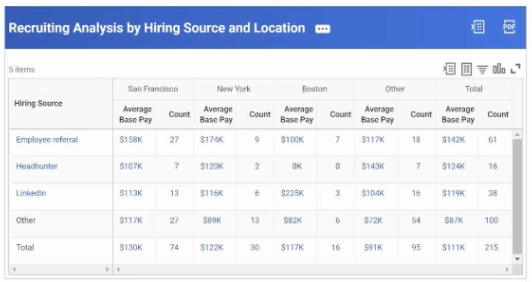
The recruiting manager wants the rows to sort by Total Count, rather than Total Average Base Pay.
How can you adjust the report definition to address this requirement?
Answer : C
In Workday reporting, row ordering is controlled on the Sort tab of the report definition. If you want the rows in a matrix report to sort by a specific field (such as Total Count), you must add that field to the Sort tab. Filters limit records, and summarizations define metrics, but sorting rules are explicitly defined in the Sort configuration.
From the Workday Reporting documentation:
''Sort -- Control the order to present and group data. You can specify options for subtotals, grand totals, and outlines. Add a row on the Sort tab to define sorting by a particular field.''
Therefore, to sort rows by Total Count instead of Total Average Base Pay, the correct step is C. Add a new row to the grid on the Sort tab.
Unlock All Features of Workday-Pro-HCM-Reporting Dumps Software
Just have a look at the best and updated features of our Workday-Pro-HCM-Reporting dumps which are described in detail in the following tabs. We are very confident that you will get the best deal on this platform.
Select Question Types you want
Set your desired pass percentage
Allocate Time (Hours: Minutes)
Create Multiple Practice test with limited questions
Customer Support
Latest Success Metrics For actual Workday-Pro-HCM-Reporting Exam
This is the best time to verify your skills and accelerate your career. Check out last week's results, more than 90% of students passed their exam with good scores. You may be the Next successful Candidate.
95%
Average Passing Scores in final Exam
91%
Exactly Same Questions from these dumps
90%
Customers Passed Workday-Pro-HCM-Reporting exam
OUR SATISFIED CUSTOMER REVIEWS
Devers
July 21, 2026
I was told that PremiumDumps is the solution to all of my worries regarding Workday-Pro-HCM-Reporting test. I obtained 98% score and it justifies the reputation of PremiumDumps.
James Henry
July 20, 2026
Premiumdumps made me self-confident and assured with success. Its real exam simulation and self assessment tools helped me to pass Workday-Pro-HCM-Reporting exam with good grades.
Marta Lopez
July 18, 2026
Premiumdumps has proven accommodating, which helped me to develop self confidence by offering self-evaluation tool. The self-assessment feature helped me to recognize my weak areas so I can overcome them. Thanks to Premiumdumps.
Grim
July 16, 2026
Premiumdumps Practice Questions have been a help for me whilst preparing for my Workday-Pro-HCM-Reporting test. I wanted to have 99% marks in the test and I did! Thanks to Premiumdumps!
Jhonson
July 13, 2026
Premiumdumps is providing a very reliable support to all of the customers and so to me! I am very much obliged! I got 85% marks in my Certification test and this happened just because of Premiumdumps.
João Silva
July 12, 2026
I would like to share, initially I was not sure if I could pass the Workday Pro HCM Reporting Certification Exam , because I didn’t get time to prepare for it. But Premiumdumps Practice exam helped me to fulfill my dream. The user friendly interface made be acquainted with the actual exam by offering the real exam simulation. I give all credits to Premiumdumps.
Ava Grace
July 9, 2026
When I got enrolled in Workday-Pro-HCM-Reporting, I was told that Premiumdumps is the only key to all of my worries regarding my Exam. I scored well and it justifies the standard of Premiumdumps