
Which two of the following formats can chart reports be exported into?
Answer : A, B
The export capabilities for chart-based reports are designed to provide both a visual representation and the underlying raw data. According to the SolarWinds Platform Administrator Guide, when viewing or scheduling a report that contains charts or graphs, the system supports two primary export formats:
PDF: This format is the standard for visual reports. It captures the rendered chart exactly as it appears in the Web Console, making it ideal for email distribution to management or for archival purposes where the visual trend is more important than the individual data points.
CSV (Comma Separated Values): When a chart is exported to CSV, the platform extracts the time-series data points used to generate that chart. This allows technical staff to import the raw performance numbers into external tools like Excel for deeper statistical analysis that may not be possible within the standard web view.
While the broader reporting engine supports Excel (.xls) for tabular reports (as seen in Question 8), the specific function for exporting chart components often defaults to CSV for the data layer and PDF for the visual layer. XML (Option D) is typically reserved for report definitions (transferring a report from one server to another) rather than exporting the data results of a chart.
What is the effect of checking the Encrypt connections with SSL box in the configuration wizard?
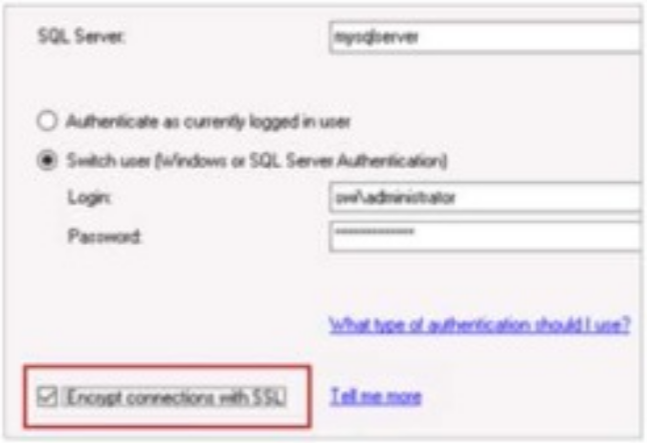
Answer : D
According to the SolarWinds Platform configuration documentation, the option to Encrypt connections with SSL during the database configuration wizard specifically dictates the security level of the communication channel between the application server and the database backend. When this box is checked, the platform ensures that the network data between SolarWinds' Hybrid Cloud Observability Platform server and the SQL server will be encrypted. This security measure is critical for protecting the integrity and confidentiality of the performance metrics, configuration data, and credentials as they traverse the internal network between these two primary architectural components.
This encryption utilizes Transport Layer Security (TLS) to wrap the TDS (Tabular Data Stream) protocol used by Microsoft SQL Server. By enabling this feature, the platform prevents potential 'man-in-the-middle' attacks where an adversary could sniff network traffic to intercept sensitive monitoring data or administrative information stored within the SQL database. It is important to note that for this setting to function correctly, the SQL Server must be configured with a valid SSL/TLS certificate that is trusted by the SolarWinds application server.
This setting differs from simple credential encryption (Option C) or secure storage (Option B) because it applies to all data transmitted during the session, not just the initial login exchange. Furthermore, while the configuration wizard does require a login account (Option A), that account's specific permissions are a separate functional requirement from the underlying encryption of the transport layer. Enabling SSL encryption is a standard best practice for organizations following strict compliance frameworks like HIPAA, PCI-DSS, or SOC2, where protecting data-in-transit is a mandatory requirement even on internal, 'trusted' network segments. This centralized encryption toggle simplifies the deployment of high-security observability environments by orchestrating the secure connection parameters through the standard SolarWinds Configuration Wizard interface.
Which two of the following statements apply to predefined alerts on SolarWinds Hybrid Cloud Observability (HCO)? (Choose two.)
Answer : A, D
Predefined alerts (out-of-the-box alerts) come built into Hybrid Cloud Observability to provide immediate value. According to the SolarWinds Platform Alerting Guide, these alerts have specific behaviors regarding modification.
Default Email Recipients (A): Many predefined alerts include a 'Send an Email' action by default. However, for these to work, an administrator must first configure the global SMTP settings and ensure that 'Default Recipients' are defined, or the alert will have no destination for its notifications.
Conditions cannot be directly edited (D): To protect the integrity of the built-in logic, the platform often prevents users from directly overwriting the trigger and reset conditions of a predefined alert. Instead, the recommended workflow is to 'Duplicate and Edit,' allowing the user to create a customizable copy of the alert while keeping the original out-of-the-box version intact for reference.
Option B is incorrect as SolarWinds does not automatically use the registration email for monitoring notifications. Option C is generally incorrect because while conditions are often locked, administrators are usually allowed to add or modify actions (like adding a specific email address) to a predefined alert to make it functional for their specific environment.
How can access to all reports be removed from user accounts?
Answer : D
In the SolarWinds Platform, report access is governed by both functional permissions and account limitations. While 'Disable Manage Reports' (Option B) prevents a user from editing or creating reports, it does not necessarily hide the 'Reports' menu or prevent the user from viewing existing reports they have access to. To completely remove the visibility and accessibility of all reports for a specific user account, an Account Limitation must be applied.
According to the SolarWinds Platform User Account Management documentation, account limitations act as a security filter that restricts what the user can see throughout the entire Web Console. By navigating to Settings > All Settings > Manage Accounts, selecting the user, and editing their Report Limitation, an administrator can choose 'No Reports'. This configuration ensures that when the user logs in, the Reports section will either be empty or completely hidden from their navigation bar, regardless of their other permissions. This is the most effective method for high-security environments or multi-tenant deployments where certain users should have zero visibility into the historical performance data or inventory summaries contained within the reporting engine.
Which two of the following ways can objects be selected when creating custom reports?
Answer : A, D
When creating a web-based report in the SolarWinds Platform, the first step is defining the 'Selection Method' for the entities you want to include. According to the SolarWinds Platform Reporting Guide, the platform offers two primary user-friendly ways to define the scope of a report:
Static Selection: This method allows the administrator to manually pick specific nodes, interfaces, or applications from a list. This is best suited for reports targeting a fixed set of infrastructure, such as 'Core Data Center Switches'.
Dynamic Query Builder: This is the most powerful method for automated reporting. It allows you to define a set of rules---such as 'Vendor is Cisco' and 'Department is Finance'---that automatically update the report's content as new devices are added to monitoring that match those criteria.
While advanced users can use SWQL (SolarWinds Query Language) or SQL to define a custom selection, PostgreSQL (Option B) is not used as the backend database for the SolarWinds Platform. Furthermore, while PowerShell (Option C) can be used to extract data via the SolarWinds Information Service (SWIS) API, it is not a selection method used within the native Web-Based Report builder interface.
Unlock All Features of SolarWinds Observability-Self-Hosted-Fundamentals Dumps Software
Just have a look at the best and updated features of our Observability-Self-Hosted-Fundamentals dumps which are described in detail in the following tabs. We are very confident that you will get the best deal on this platform.
Select Question Types you want
Set your desired pass percentage
Allocate Time (Hours: Minutes)
Create Multiple Practice test with limited questions
Customer Support
Latest Success Metrics For actual Observability-Self-Hosted-Fundamentals Exam
This is the best time to verify your skills and accelerate your career. Check out last week's results, more than 90% of students passed their exam with good scores. You may be the Next successful Candidate.
I have recently passed SolarWinds Observability-Self-Hosted-Fundamentals exam with the excellent results, on the first attempt. I owe thanks to Premiumdumps, who helped to become certified Professional.
João Silva
July 20, 2026
I would like to share, initially I was not sure if I could pass the SolarWinds Observability Self-Hosted Fundamentals exam, because I didn’t get time to prepare for it. But Premiumdumps Practice exam helped me to fulfill my dream. The user friendly interface made be acquainted with the actual exam by offering the real exam simulation. I give all credits to Premiumdumps.
Marta Lopez
July 17, 2026
Premiumdumps has proven accommodating, which helped me to develop self confidence by offering self-evaluation tool. The self-assessment feature helped me to recognize my weak areas so I can overcome them. Thanks to Premiumdumps.
James Henry
July 15, 2026
Premiumdumps made me self-confident and assured with success. Its real exam simulation and self assessment tools helped me to pass Observability-Self-Hosted-Fundamentals exam with good grades.
Ava Grace
July 13, 2026
When I got enrolled in SolarWinds Observability-Self-Hosted-Fundamentals, I was told that Premiumdumps is the only key to all of my worries regarding my Exam. I scored well and it justifies the standard of Premiumdumps
David Smith
July 11, 2026
When I got registered for SolarWinds Observability-Self-Hosted-Fundamentals exam, I was so afraid even to try. I gave-up initially, but then I found Premiumumps and today I am proud to make a right decision. I only spend 7 days in preparation, but the result was unanticipated. I got 100% marks and finally advanced my credentials.
Charlie
July 10, 2026
I wish to express thank PremiumDumps very much for being here. I passed SolarWinds Observability-Self-Hosted-Fundamentals test with a good score!