In the Skope IT interface, which two event tables would be used to label a cloud application instance? (Choose two.)
Answer : B, C
In the Skope IT interface, which is a feature in the Netskope platform that allows you to view and analyze all the activities performed by users on cloud applications, there are two event tables that would be used to label a cloud application instance: Page Events and Application Events. Page Events are events that capture the URL and category of the web pages visited by users, as well as the time spent and the bytes transferred on each page. Application Events are events that capture the details of the actions performed by users on cloud applications, such as upload, download, share, edit, delete, etc. You can use these event tables to label a cloud application instance by applying filters based on the domain name or URL of the instance, such as drive.google.com/a/yourcompany.com or slack.com/yourteam. You can then assign a custom label to the filtered events and use it for reporting or policy enforcement. Network Events and Alerts are not event tables that would be used to label a cloud application instance, as they are more related to network traffic or policy violations, rather than cloud application activities.Reference:[Netskope Skope IT],Netskope Security Cloud Operation & Administration (NSCO&A) - Classroom Course, Module 8: Skope IT.
When accessing an encrypted website (HTTPS), what is a reason why you might receive a "certificate not trusted" browser message?
Answer : B
When accessing an encrypted website (HTTPS), a 'certificate not trusted' message in the browser usually occurs because the certificate presented by the website is not issued by a trusted Certificate Authority (CA). A common scenario for this is when a self-signed certificate is installed on the server. Self-signed certificates are not signed by a CA that is recognized by the browser, so the browser cannot verify the authenticity of the certificate, leading to the 'certificate not trusted' message.
'If the SSL certificate is self-signed, the browser will not trust the certificate because it has not been issued by a trusted CA.'.
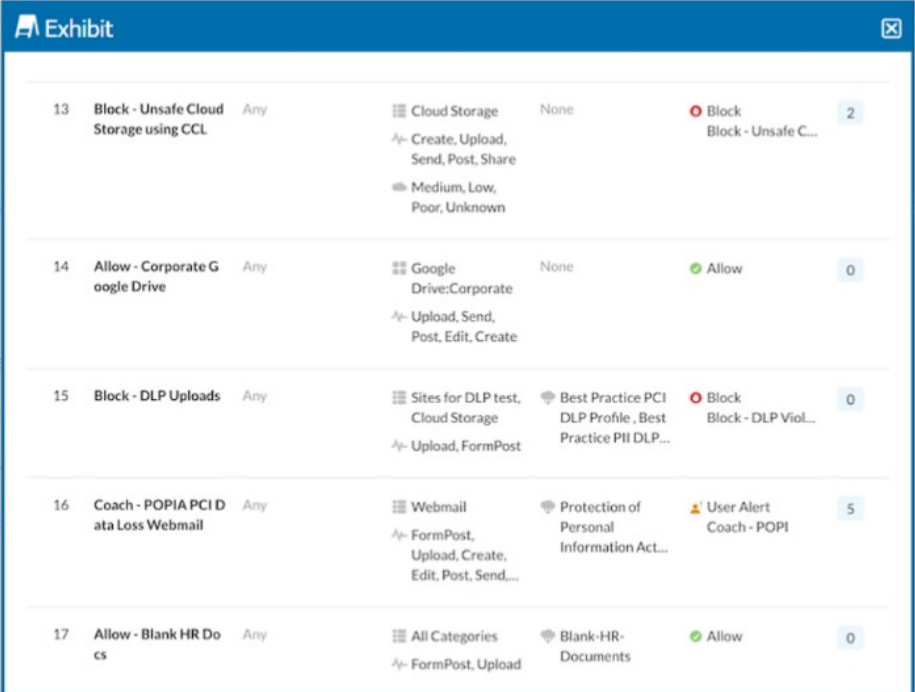
A user is uploading a file containing PCI-DSS data to the corporate Google Drive instance. You notice that the upload is not blocked by the policy shown in the exhibit. Which statement is correct in this scenario?
Answer : C
In the exhibit, a user is uploading a file containing PCI-DSS data to the corporate Google Drive instance. Despite the policy that blocks DLP (Data Loss Prevention) uploads being active, the upload is not blocked. This indicates that the policy is not applied in the correct order.
Netskope applies policies in a top-down manner. If there are multiple policies that could apply to an action, the order in which the policies are evaluated is crucial. In this case, another policy might be allowing the upload before the DLP policy can block it. Ensuring that the DLP policy is higher in the order can resolve this issue.
Netskope policy configuration and enforcement documentation.
Details on how Netskope processes and applies policies based on their order in the policy list.
Which three security controls are offered by the Netskope Cloud platform? (Choose three.)
Answer : B, C, E
Three security controls that are offered by the Netskope Cloud platform are: C. cloud security posture management, E. threat protection, and B. data loss prevention for SMTP.
Cloud security posture management is a service that provides continuous assessment and remediation of public cloud deployments for risks, threats, and compliance issues. Netskope CSPM leverages the APIs available from cloud service providers such as AWS, Azure, and GCP to scan the cloud infrastructure for misconfigurations, such as insecure permissions, open ports, unencrypted data, etc. Netskope CSPM also provides security posture policies, profiles, and rules that can be customized to match the security standards and best practices of the organization or industry.
Threat protection is a capability to detect and block malware, ransomware, phishing, and other cyber threats that may compromise cloud data or users. Netskope threat protection uses advanced techniques such as machine learning, sandboxing, threat intelligence, and behavioral analysis to identify and prevent malicious activities in real time. Netskope threat protection also integrates with third-party solutions such as antivirus engines, firewalls, SIEMs, etc., to provide comprehensive defense across the cloud and web1.
Data loss prevention for SMTP is a feature that allows you to protect sensitive data that is sent or received via email. Netskope DLP for SMTP can scan email messages and attachments for predefined or custom data patterns, such as credit card numbers, social security numbers, health records, etc., and apply appropriate actions, such as block, quarantine, encrypt, notify, etc., based on the DLP policies. Netskope DLP for SMTP can also support multiple email domains and routing rules for different groups of users2.
All users are going through Netskope's Next Gen SWG. Your CISO requests a monthly report of all users who are accessing cloud applications with a "Low" or a "Poor" CCL, where the activity is either "Edit" or "Upload".
Using the Advanced Analytics interface, which two statements describe which actions must be performed in this scenario? (Choose two.)
Answer : A, B
Create the Report in Advanced Analytics:
Data Collection:
Use the 'Page Events' data collection, which captures detailed user activities on web pages, including edits and uploads.
Filters:
Apply filters to include only the activities 'Edit' and 'Upload'.
Add another filter for the Cloud Confidence Level (CCL) to include only those with 'Low' or 'Poor' ratings.
This ensures the report focuses on the specified user activities within cloud applications that have lower security ratings.
Steps:
Navigate to Advanced Analytics > Reports.
Create a new report and select 'Page Events' as the data collection source.
Apply the necessary filters for activities and CCL values.
Schedule the Report:
Monthly Recurrence:
Set the report to run on a monthly schedule to ensure regular updates.
Configure the report to be sent via email with a PDF attachment.
Steps:
In the report scheduling options, set the recurrence to monthly.
Specify the email recipients, ensuring the CISO receives the report.
Select PDF as the report format.
Reference:
For more details on creating and scheduling reports, refer to the Netskope documentation on Advanced Analytics and report generation.
Unlock All Features of Netskope NSK101 Dumps Software
Just have a look at the best and updated features of our NSK101 dumps which are described in detail in the following tabs. We are very confident that you will get the best deal on this platform.
Select Question Types you want
Set your desired pass percentage
Allocate Time (Hours: Minutes)
Create Multiple Practice test with limited questions
Customer Support
Latest Success Metrics For actual NSK101 Exam
This is the best time to verify your skills and accelerate your career. Check out last week's results, more than 90% of students passed their exam with good scores. You may be the Next successful Candidate.
95%
Average Passing Scores in final Exam
91%
Exactly Same Questions from these dumps
90%
Customers Passed Netskope NSK101 exam
OUR SATISFIED CUSTOMER REVIEWS
Alfie Jack
July 21, 2026
With these dumps, I wasn’t able to get the best score in the NSK101 exam, but practice simulation made advanced encryption concepts easy to prepare. I’m satisfied and give credit to your team for designing real-life scenarios. Good investment!
Ryder Paul
July 19, 2026
The platform helped me learn faster for the "NSK101 exam; I didn’t have to focus on all topics, and the tool made it structured for me to get a grip on network security protocols. I did well in the exam despite not working so hard. Thanks a ton, folks
Henry James
July 17, 2026
My memory isn’t very sharp; I had trouble memorizing complex VPN protocols . With these practice simulations, I prepared my mind to become clearer and felt confident on the exam day. Overall good help from your platform! Thanks