
Get Adobe AD0-E906 Exam Practice Questions - Real and Updated
Adobe Workfront for Experience Manager Enhanced Connector Expert Exam Dumps
This Bundle Pack includes Following 3 Formats
Test software
Practice Test
Answers (PDF)

AD0-E906 Desktop Practice
Test Software
Total Questions : 55

AD0-E906 Questions & Answers
(PDF)
Total Questions : 55

AD0-E906 Web Based Self Assessment Practice Test


Following are some AD0-E906 Exam Questions for Review


An implementation consultant wants to configure the enhanced connector inside a customer's Adobe Experience Manager environment. The customer needs the following functionality, automatic creation of project linked folders, comments syncing, and the automatic publishing of assets. How should the consultant navigate to the enhanced connector configuration screens?
A developer implements a custom workflow process using the following code:
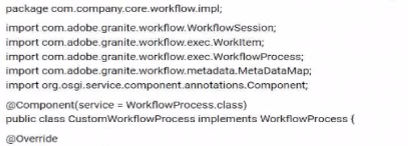
The code bundle has been deployed to AEM and displays as active in the Web Console. The developer has created a new workflow model, added a process step, and wants to configure that step to use the custom workflow process. However, the custom workflow process does not appear in the dropdown menu.
What should be done to resolve this issue?
A solutions consultant needs to configure the enhanced connector for a customer. The customer has asked the solutions consultant to make sure that changes to metadata in Experience Manager will be synced back to Workfront on linked Workfront documents. Two of the fields that the customer wants synced are Content Type and Effort They are defined in workfront and Experience Manager as the following:
Document custom form fields in Workfront:
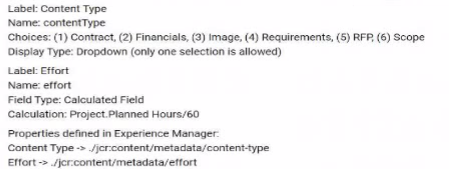
To accomplish this work, the solutions consultant configures a workflow model. The workflow model has a single step, Workfront-Map Property'.
What Property Assignments will make sure changes in Experience Manager are reflected in Workfront?
A)

B)

C)

A web designer creates interactive web content via a URL. which needs to be approved I he user doing the reviewing has a Manager proofing permission profile in Adobe workfront. which they are currently accessing through the latest version of the Chrome browser. As part of the feedback process, the reviewer is required to leave comments on one page of the arte being reviewed before leaving the approval status. The Designer must be tagged in any updates required
which tool should be used to accomplish this?
A developer modified the default image metadata schema to include a text field with the property 'myProject:photographer'. While testing, the developer edited the metadata of an asset and entered the name 'Sabastiao Salgado' onto the custom field. However, the developer encountered an Issue and noticed that the value of the custom field does not display on a component.
What is a possible cause of this issue?
Unlock All Features of Adobe AD0-E906 Dumps Software

Types you want

pass percentage

(Hours: Minutes)

Practice test with
limited questions

Support


